Short answer
On Meesho, the “seal” that matters most is the tamper-evident seal of the packet itself: a sealed Meesho branded polybag with a QR code that is scanned with the AWB, so it is clear if the parcel was opened. Many suppliers also attach a seal tag (a plastic tie-lock tag) to the product, so a used or swapped product is easier to spot when it comes back. Add a packing video and the correct label, and you have the proof Meesho asks for in a dispute.
“Seal on Meesho”, “Meesho seal” and “Meesho tag” are searched by two kinds of people: customers wondering about the tag on a product, and suppliers wondering what they should put on their parcels. This guide is for suppliers.
Three kinds of “seal” on a Meesho order
| Seal | What it is | Why it helps |
|---|---|---|
| Packet seal | The tamper-evident adhesive flap on the Meesho polybag | Shows if the parcel was opened in transit |
| Branded packet QR / code | The code on a Meesho branded packet, scanned with the AWB | Links the packet to the order and helps reduce RTO fraud |
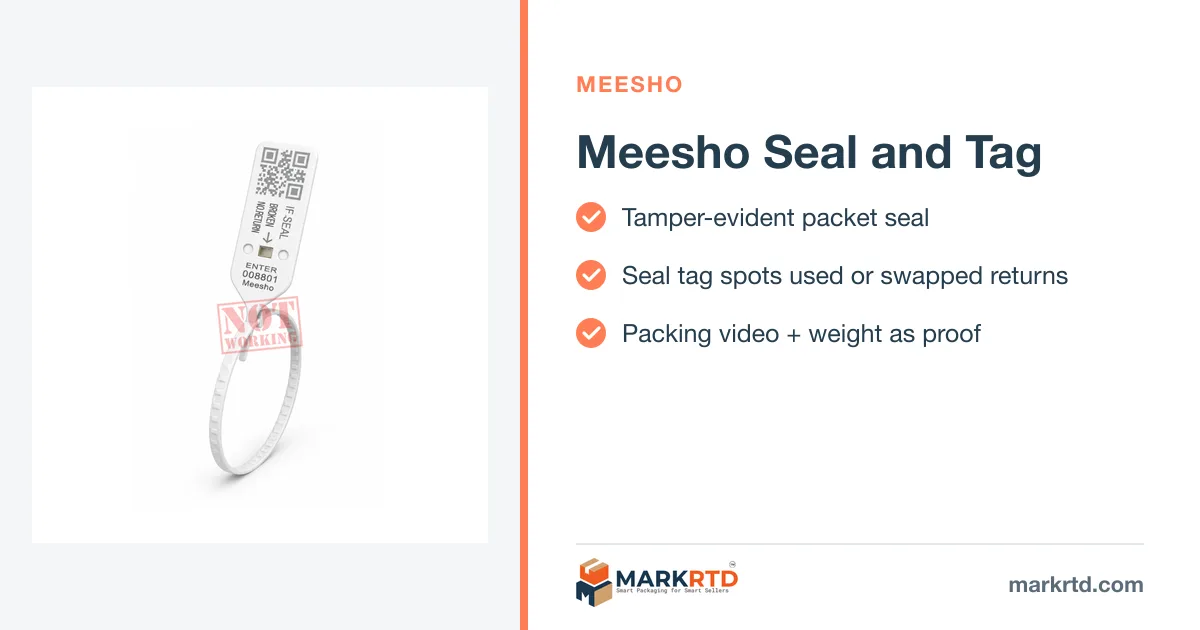
| Seal tag on the product | A plastic tie-lock tag through the product or its label | A used or swapped product is easy to spot on return |
The packet seal
A good Meesho barcode polybag has a strong, tamper-evident flap. Once closed, peeling it should tear the film or leave a visible mark. If your bags peel and re-stick cleanly, change your supplier. A broken seal is your first piece of evidence when a customer says the parcel arrived empty.
Branded Meesho packaging adds a code on the packet that is scanned along with the AWB. That maps the packet to the order and makes it harder for anyone to swap the contents on the way back. More in Meesho authorised packaging material.
Seal tags on the product
A seal tag is a plastic tie-lock tag fixed through the product's label or a seam. Customers can try the product on, but can't remove the tag without cutting it. Suppliers use them to:
- Spot a product that was used and sent back.
- Spot a swapped product, especially when the tag has a number you record.
- Look more professional, like branded retail.
Most seal tags sold for Meesho are non-working (dummy) seal tags. They look and lock like a security tag, but they aren't registered with Meesho. They're a deterrent and a check for you, not an official Meesho requirement. If you print “No return if seal tag is removed” on a card, make sure your listing's return terms match Meesho's actual return policy.
Proof that holds up in a Meesho claim
- Packing video for every order: show the product, the tag, the sealing and the label in one take.
- Parcel weight on a scale in the video.
- Seal photo on returns before you open them, if the seal looks tampered.
- Raise the claim within the window shown in your supplier panel.
Meesho label tips
Stick the Meesho shipping label flat on the front of the bag, never over the seal or a fold. Crop labels to 4×6 with the Meesho label cropper if you use a thermal printer. For the full packing routine, see Meesho packaging rules.
Shop the packaging in this guide
Free seller tools for this
Frequently asked questions
What is the seal on Meesho packaging?
The tamper-evident adhesive seal on the Meesho polybag. Branded Meesho packets also carry a code that is scanned with the AWB.
Do Meesho suppliers need seal tags on products?
They are not a general Meesho requirement, but many suppliers use them to spot used or swapped products when returns come back.
What is a non-working seal tag?
A plastic tie-lock tag that looks like a security tag but is not registered with any marketplace. It works as a deterrent and a check for the seller.
How do I prove a Meesho parcel was packed correctly?
Record a packing video showing the product, seal tag, sealing, label and parcel weight, and raise the claim within the window in your supplier panel.
Read next
- Meesho Packaging Rules for Suppliers: What to Follow in 2026Meesho packaging rules for suppliers: branded packaging, polybag vs box, label placement, weight slabs and packing proof for wrong or missing product claims.
- Meesho Authorised Packaging Material: How It Works and Where to BuyWhat Meesho authorised (branded) packaging material is, how the QR packet code works with your shipping label, whether it is compulsory, and how to buy it safely.
- Tamper Proof Packaging Benefits for Online SellersBenefits of tamper proof packaging for online sellers: fewer empty-packet claims, proof in disputes, less pilferage, safer RTOs, more trust.
- Myntra Tag Loop Number: What It Is and What If the Seal Tag BreaksMyntra tag loop number explained: what the tag loop is, why it must stay intact for returns, what to do if the seal tag breaks, and how sellers capture the code.